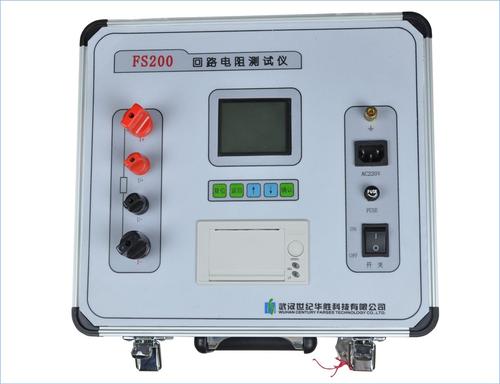

Instructions for Using the Loop Resistance Tester
Darui Electric recommends:
Loop Resistance Testeris a dedicated instrument for measuring the contact resistance and loop resistance of switch control equipment. The test current adopts the 100A DC recommended by the national standard GB763. It can directly measure the loop resistance or contact resistance under currents of 100A, 200A, 300A, 400A, 500A, or 600A, and display it directly. It can also save the data to the instrument, with a maximum of 100 groups. The saved data can be communicated with the host computer via the RS232 interface, uploaded to the computer for storage or printing. This instrument features accurate measurement and stable performance, making it suitable for on-site high-voltage switch maintenance in power and power supply departments, as well as for loop resistance testing requirements in high-voltage switch factories.
Instructions for Use
1. According to the four-wire measurement method, connect the test object to the instrument panel using the dedicated test leads. Note that the voltage measurement leads should be connected on the inner side of the current output leads.
2. Connect the AC220V power supply (note: the third wire of the power input, i.e., the protective ground, must be connected to the earth), and press the power switch. At this time, the ammeter and resistance meter display "000" (a one-digit fluctuation is allowed).
�� 3. Press the measurement switch, adjust the current output knob (clockwise) until the ammeter displays "100.0", then read the number on the resistance meter, which is the resistance value of the test object, and record it. (If it displays "1", it indicates that the measured loop is over-range).
4. After testing, adjust the current output knob (counterclockwise) to the minimum, reset the measurement switch, and then turn off the power switch.
5. To repeat the test, simply reset the measurement switch, re-clamp the test clips, and press the measurement switch again.
Operating Procedure
1. Connect the wires according to the four-terminal connection method.
2. Turn on the power.
3. Press the measurement key (if the current display A value is less than 100A, it can be corrected via the panel current fine-tuning).
4. After the measurement value is displayed, save the data if needed.
5. After the measurement, please turn off the power.
6. Please take care of the test clips.